
How can real estate photographers get paid faster?
One of the most effective ways to reduce payment delays as a real estate photographer is to connect payment directly to project delivery.
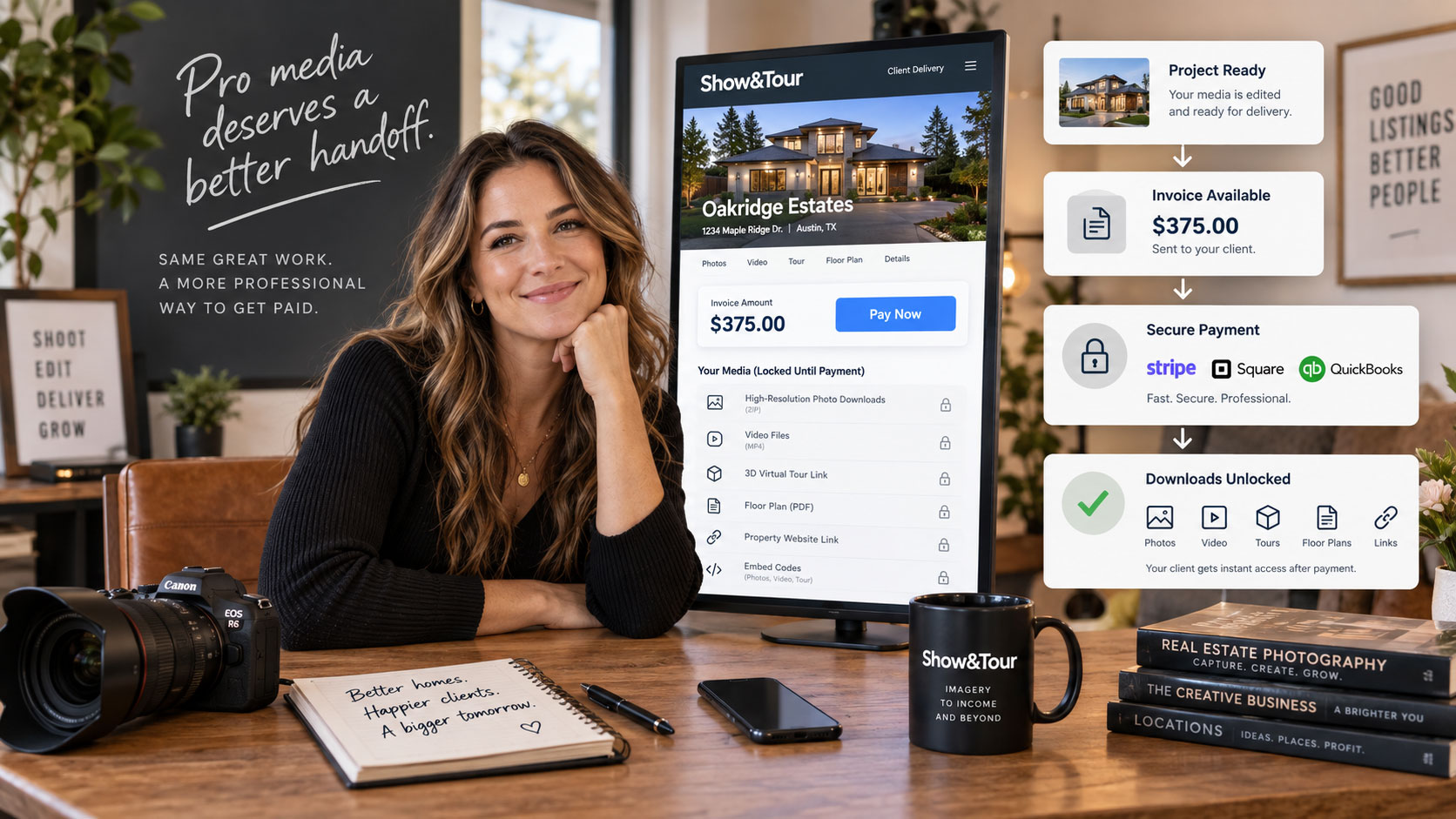
Instead of sending final media first and chasing an invoice afterward, a pay-to-download workflow lets you finish the project, send the invoice, and keep final downloads and other gated deliverables locked until payment is complete.
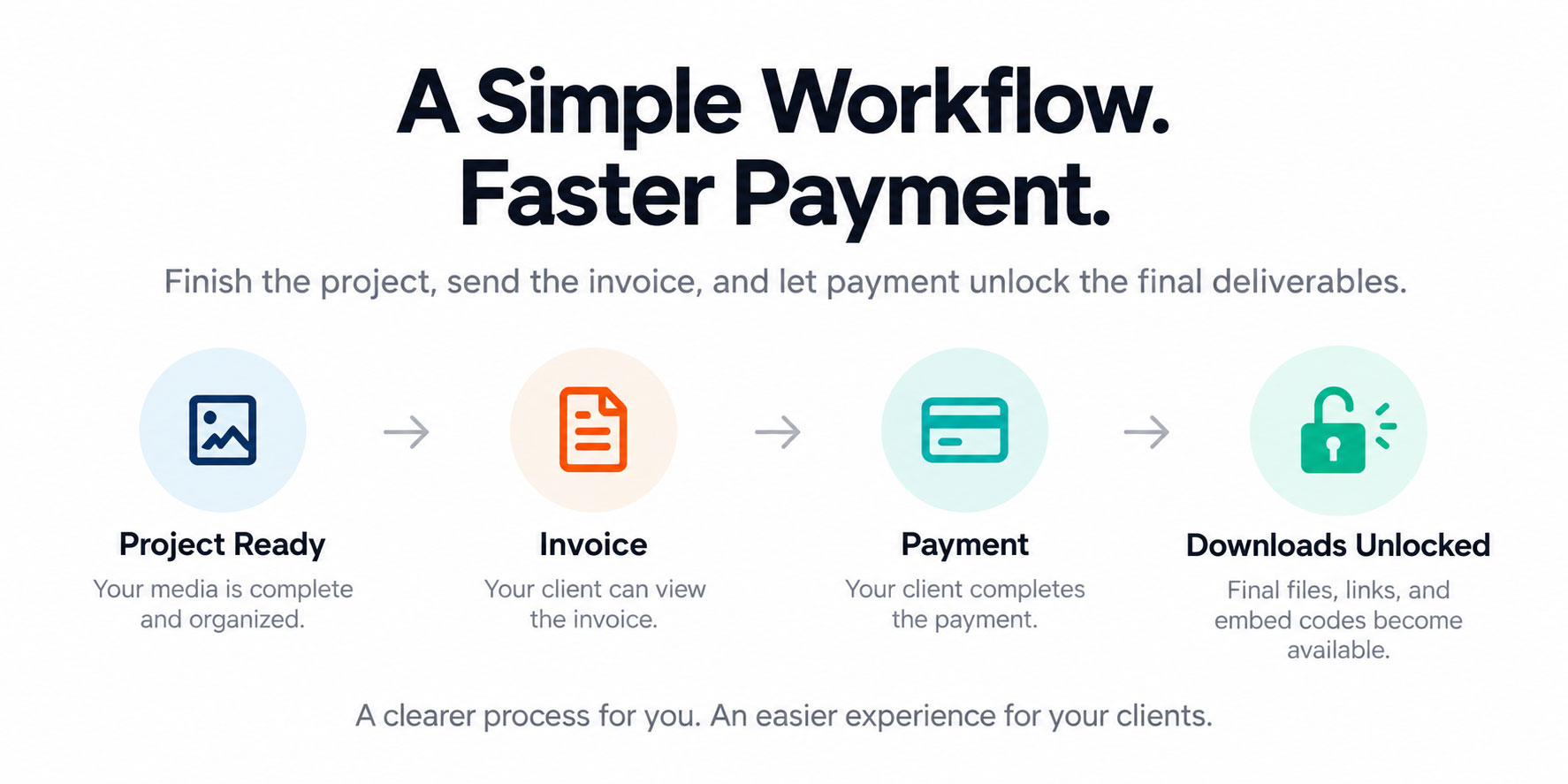
With Show&Tour, that workflow can look like this:
Project ready → Invoice → Payment → Downloads unlocked
It gives your client a clear next step while helping you protect the work you have already completed.
And it means getting paid does not have to become another project after the project is finished.
Why real estate photographers struggle with late payments
You scheduled the shoot.
You captured the property.
You edited the photos and video.
You prepared the final media.
The project is ready.
Then the invoice gets sent somewhere else.
The client gets busy. The invoice email gets buried. The media has already been delivered. A few days later, you are following up on payment for work you already completed.
For many real estate photographers, slow payment is not only an invoicing problem.
It is a delivery workflow problem.
When the invoice, payment, and final deliverables all live in separate places, payment can easily become an afterthought.
Real estate agents are busy. They are managing listings, sellers, buyers, showings, inspections, paperwork, marketing, contractors, and constant communication.
If your invoice arrives separately from the project, it becomes another task competing for attention.
A more connected workflow makes payment part of the client handoff instead.
What is pay-to-download for real estate photography?
Pay-to-download is a delivery workflow that requires a client to complete payment before accessing final gated deliverables.
With Show&Tour, you can prepare a branded Delivery Page containing the project information, media, invoice, links, licensing terms, and other details your client needs.
When pay-to-download is enabled, gated downloads, shareable links, and embed codes remain locked until payment is complete.
The client gets a straightforward experience:
- Open the project.
- See that the media is ready.
- Review the invoice.
- Complete payment.
- Access the final deliverables.
Instead of delivering everything first and hoping the invoice gets handled afterward, payment becomes part of the delivery process.
Why use pay-to-download?
Pay-to-download creates a clearer boundary between finishing the work and releasing the work.
Without that boundary, a typical workflow might look like:
Project ready → Files delivered → Invoice sent → Reminder → Another reminder
The client already has what they need, while you are still checking whether the invoice was paid.
With pay-to-download, the order becomes:
Project ready → Invoice → Payment → Final access
Your client can still see that the project is complete. They know where to go, what they owe, and what needs to happen next.
You are simply connecting payment to delivery.
That can help real estate photographers:
- Reduce manual payment follow-up
- Protect final deliverables until payment is complete
- Make payment expectations clearer
- Keep invoicing connected to the project
- Create a more consistent client workflow
- Present the handoff through a professional, branded experience
Pay-to-download cannot guarantee when every client will pay, but it gives you more control over when final access is released.
Payment at booking vs. payment before download
There are two common places to collect payment for a real estate photography project: before the shoot or before the final media is downloaded.
Both approaches can work. The right choice depends on your business.
| Payment at booking | Payment before download |
|---|---|
| Collects payment before the shoot | Collects payment after the work is complete |
| Can work well for fixed-price services | Works well when the final total may change |
| May require adjustments for later add-ons | Lets you finalize the invoice after add-ons are known |
| Payment happens before the client sees the completed project | Client can see that the project is ready before paying |
| Removes payment from the delivery stage | Connects payment directly to final delivery |
Payment at booking may make sense when pricing is predictable and you want to collect the full amount upfront.
But real estate media projects can change.
A client might add drone photography.
They may request a floor plan or video.
The property could fall into a different pricing tier.
There may be travel charges, additional edits, or other services added after booking.
Pay-to-download gives you the option to finish the work, finalize the invoice based on the actual project, and then release the gated deliverables after payment.
Protect your real estate media without making payment awkward
Most real estate photographers want to make life easy for their clients.
The listing needs to go live. The agent needs the media. Everyone is working against a deadline.
That can make it tempting to send everything immediately and deal with the invoice later.
But once the final deliverables have been released, payment is no longer connected to the thing the client needs.
From their perspective, the project may already feel complete.
Your invoice may not be.
Pay-to-download creates a consistent business process:
Final gated deliverables are released after payment.
You do not have to decide case by case whether to hold back a client’s files.
You do not have to make the payment conversation personal.
It is simply part of how your business delivers projects.
That makes the expectation easier to explain and easier to repeat across every job.
Connect invoicing to real estate media delivery
One of the easiest ways to create payment friction is to make your client hunt for everything they need.
Imagine receiving:
- One email for the photos
- Another link for the video
- A separate virtual tour
- A separate property website
- An invoice from another system
- Licensing terms in an email
- Additional download instructions somewhere else
Everything may technically be delivered.
But the client has to assemble the workflow themselves.
Show&Tour Delivery Pages are designed to give real estate photographers and media providers one branded destination for the private client handoff.
A Delivery Page can bring together project media, downloads, invoice and payment information, videos, virtual tours, PDFs, floor plans, links, licensing terms, and other project details.
Instead of asking your client to search through multiple emails, you can give them one organized place to handle the project.
One project. One branded destination. One clear next step.
Connect QuickBooks, Square, or Stripe to your delivery workflow
A better real estate photography payment workflow does not mean replacing the financial tools you already use.
Show&Tour integrates with QuickBooks, Square, and Stripe, with more integrations on the way.
That means you can connect project delivery to an invoicing or payment system that fits the way you already run your business.
QuickBooks + Show&Tour
If QuickBooks is already part of your accounting and invoicing workflow, you can keep using it while connecting payment more closely to project delivery.
Square + Show&Tour
If you use Square for invoices and payments, you can incorporate that payment workflow into your Show&Tour client handoff.
Stripe + Show&Tour
If Stripe is part of your online payment workflow, you can connect payment to the same project experience your client is already using to access their media.
The goal is not to replace your accounting software.
The goal is to avoid separating getting paid from delivering the project.
Make payment the natural next step
A good pay-to-download workflow should not feel like an obstacle.
It should feel obvious.
When your client opens a project Delivery Page, they should quickly understand four things:
What is this?
Their completed real estate media project.
What do I owe?
The invoice makes the amount clear.
What should I do next?
Complete payment.
What happens after payment?
The gated downloads, shareable links, and embed codes become available.
There should not be a scavenger hunt through several emails or platforms.
Payment should feel like the natural next step in receiving the final project.
Set your payment policy before delivery
Pay-to-download works best when clients know what to expect before the project reaches the delivery stage.
Your policy does not have to be complicated.
For example:
“Final media is delivered through your project Delivery Page. Payment is required before final downloads and gated project links are released.”
You may also want to make expectations clear around:
- When payment is due
- Who should receive the invoice
- Accepted payment methods
- Project add-ons
- Additional revisions
- Licensing and usage terms
- Brokerage or team billing
Clear expectations make payment less personal.
You are not suddenly introducing a restriction at the end of a project.
You are following the same professional process you use for every client.
Make real estate photography invoices easy to understand
Connecting an invoice to delivery helps, but the invoice itself should also be clear.
If a client does not immediately understand what they are paying for, they may stop to ask questions before completing payment.
Instead of:
Photography Package — $450
Consider a more descriptive line item:
Residential Listing Media Package
Interior and exterior photography, MLS-ready downloads, full-resolution images, and branded project delivery.
Depending on your services, an invoice might include:
- Property address
- Shoot date
- Package or service name
- Deliverables
- Add-ons
- Quantity
- Payment due date
- Relevant licensing information
The goal is not to make the invoice longer.
It is to remove uncertainty.
Send fewer links after the shoot
Payment friction is often one symptom of a bigger delivery problem.
One link for photos.
One for video.
One for the virtual tour.
One for the invoice.
One for the property website.
Another message for licensing.
Another email explaining downloads.
That is a lot for an agent to manage for one listing.
A branded Delivery Page lets you organize the private project handoff into one destination.
That can make it easier for clients to find the invoice, understand the next step, and access the final media after payment.
Your delivery process becomes part of the professional experience instead of an assortment of disconnected links.
What should you say when payment is required before download?
Keep the language direct and focused on your process.
Instead of:
“Sorry to bother you, but I wanted to see if you had a chance to pay the invoice.”
Try:
“Your project is ready. Once payment is complete, your final downloads will be available through your Delivery Page.”
Or:
“Your listing media is ready. You can view the invoice on the Delivery Page, and the final deliverables will unlock after payment.”
Or:
“To keep project delivery organized and consistent, final downloads are released after payment is completed.”
You are not apologizing for your business process.
You are explaining the next step.
A simple payment workflow for real estate photographers
If you want to get paid faster as a real estate photographer, your workflow does not have to be complicated.
Step 1: Set the expectation
Tell clients how payment and final media access work before delivery.
Step 2: Complete the project
Finish the shoot, editing, and other services included in the project.
Step 3: Prepare the Delivery Page
Organize the client’s photos, videos, floor plans, virtual tours, links, licensing terms, and other relevant project details.
Step 4: Finalize the invoice
Create or connect the invoice based on the completed scope of work.
Step 5: Enable pay-to-download
Keep applicable downloads, shareable links, and embed codes behind the paywall until payment is complete.
Step 6: Send one branded project destination
Give the client a clear place to view the project, see the invoice, and understand what happens next.
Step 7: Let payment unlock the final deliverables
Once payment is complete, the gated project assets become available.
The result is a payment workflow that is easier to understand, easier to repeat, and more connected to the client handoff.
Can pay-to-download guarantee on-time payment?
No software can guarantee exactly when every client will pay.
An agent may be traveling. A brokerage may process invoices on a specific schedule. A project may require internal approval from an office manager or accounting department.
Those factors are outside your control.
What you can control is your delivery process.
You can decide whether final gated deliverables are released before or after payment.
You can make the invoice easy to find.
You can communicate the payment requirement clearly.
And you can connect payment directly to the project instead of chasing an invoice after everything has already been handed over.
That gives your business a stronger foundation for reducing payment delays and payment follow-up.
Your payment workflow is part of the client experience
Getting paid is not separate from real estate media delivery.
It is part of it.
A scattered workflow can make a great project harder for the client to manage.
A clear workflow gives them:
- One organized destination
- A visible invoice
- A clear payment step
- Straightforward access after payment
- A branded experience from delivery through download
At the same time, you maintain clearer control over when your final work is released.
That is what a professional real estate media delivery workflow should feel like.
Get paid with a better real estate media delivery workflow
You should not have to choose between making life easy for your clients and protecting the work you have already completed.
Show&Tour helps bring those goals together.
Create a branded Delivery Page.
Connect your invoicing through QuickBooks, Square, or Stripe.
Use pay-to-download to keep final downloads, shareable links, and embed codes locked until payment is complete.
Then give your client one polished destination for the project.
Less chasing. Clearer payment. A more professional handoff.
Your work already looks professional.
Your delivery should too.
Try Show&Tour for free and connect payment to your real estate media delivery workflow.
Frequently Asked Questions
How can a real estate photographer get paid faster?
A clearer payment and delivery workflow can help reduce delays. One approach is to connect the invoice directly to project delivery and require payment before final gated deliverables become available. This keeps payment from becoming a separate task after the media has already been released.
What is pay-to-download for real estate photographers?
Pay-to-download means requiring payment before a client can access final gated project deliverables. In Show&Tour, this can include downloads, shareable links, and embed codes that remain locked behind the paywall until payment is complete.
Can I require clients to pay before downloading real estate photos?
Yes. With a pay-to-download workflow, you can finish the project and make the invoice available while keeping final downloads locked until the payment requirement has been satisfied.
Does Show&Tour integrate with QuickBooks, Square, and Stripe?
Yes. Show&Tour integrates with QuickBooks, Square, and Stripe for invoicing and payment workflows, with additional integrations planned.
Is it better to charge before the shoot or before clients download their photos?
Either approach can work. Collecting payment at booking can be useful for predictable, fixed-price services. Requiring payment before download can be useful when the final total may change because of add-ons, travel, additional media, or other services completed during the project.
What can a Show&Tour Delivery Page include?
A Delivery Page is the private client handoff for a project. It can organize items such as photos, videos, downloads, invoices and payment, virtual tours, PDFs and floor plans, links, terms, and licensing information in one branded destination.
Does pay-to-download guarantee that every client will pay on time?
No. Client approval processes and payment schedules can still affect when an invoice is paid. Pay-to-download helps connect access to payment and can reduce the need to release final deliverables before an invoice is complete.